
Company
Front
Role
Lead Product Designer, Live Chat
The team
1 PM, 3 AI engineers, 4 full-stack engineers, 1 data scientist
Timeline
Phase 1: 4 weeks in Aug '23
Phase 2: 2 weeks in Dec '23
01. DEFINE
The Problem
Customer Support teams care deeply about providing quality service, but they're often overwhelmed by repetitive, low-effort questions like "What time does your store close?" or "How do I reset my password?"
Over time, that repetition can feel draining and lead to low morale for teams who'd rather focus on more meaningful, complex customer needs.

"I don't want my teammates to feel like you're answering the same damn question over and over again."
— Marisa, Support Team Manager
As the lead product designer for Front's Live Chat team, this was a problem I heard constantly. Support teams wanted relief from repetitive, simple inquiries, but only if it didn't come at the cost of customer experience.
At the time, my team and I had built a live chat experience from the ground-up, with chatbots that could be customized to help answer those repetitive, simple inquiries.
"For common questions where it's a deterministic answer, then we try to use the bot because it doesn't sacrifice customer experience. "
— Daniel, Support Team Manager

In 2023, as LLMs like ChatGPT and Claude entered the mainstream, our customers became increasingly interested in how chatbots could use AI to further amplify the resolution of repetitive inbound inquiries.
At the same time, expectations in the market were shifting. Competitors like Intercom launched their own live chat AI assistants, raising the bar for what clients considered table stakes. We began to see real business impact: over $100K in deals were at risk or lost due to the absence of live chat AI capabilities in our product. Our customers wanted generative AI in live chat.
This made the challenge urgent and clear. How might we keep Front's live chat feature competitive and push chatbot automation even further to reduce time support teams spend on simple, repetitive inquiries?
That question shaped the core focus of this project: designing a live chat AI experience that’s intelligent, accurate, configurable, and aligned with the quality of service support teams are proud to deliver.
02. DEFINE
The Opportunity
We had already built a strong foundation of user understanding through research I co-led with my PM, including detailed personas and jobs-to-be-done.
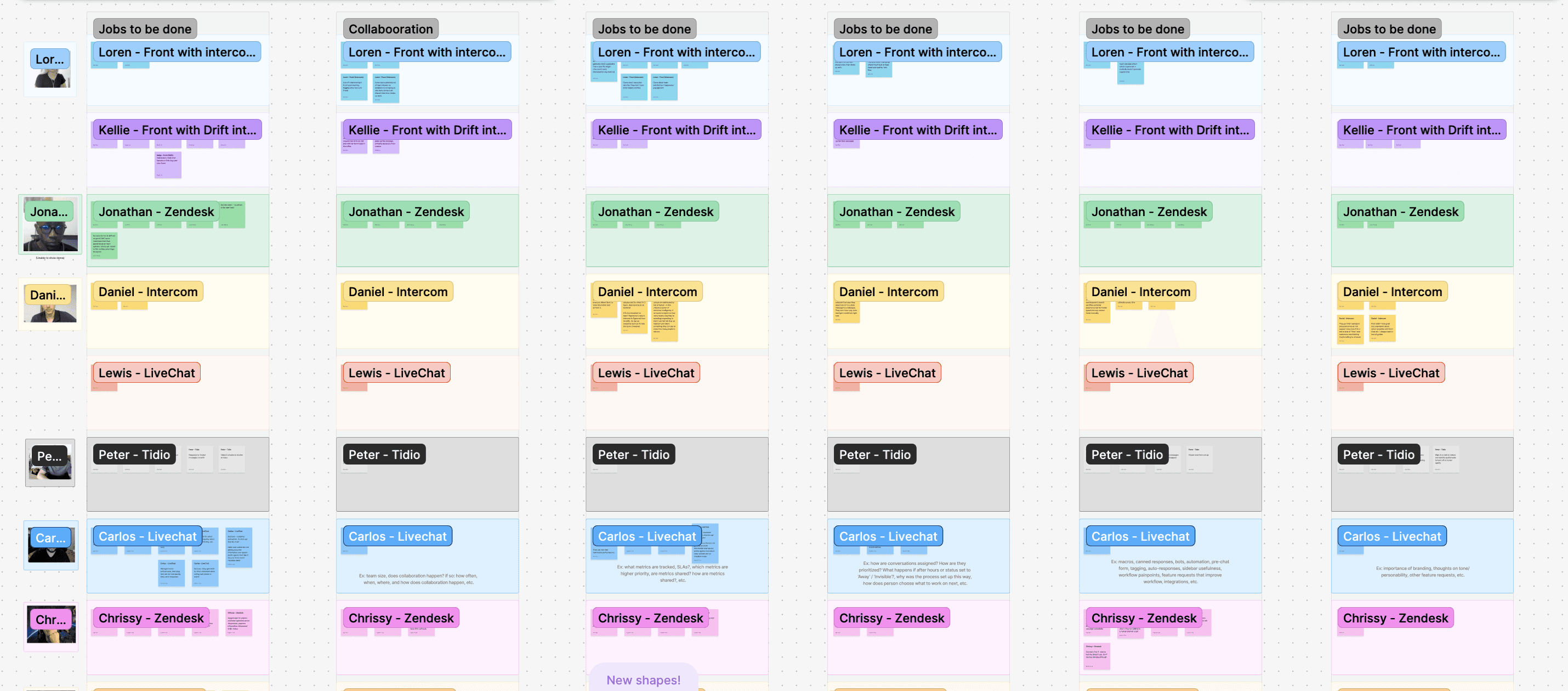
To anchor us in real user needs, I mapped out what each of our four core personas would want from an AI experience. This helped the team move beyond abstract use cases and center our decisions around user-specific goals and needs.
Who we're building for
01. Support Manager
Support managers are the primary decision makers when it comes to spending money on Front. They use chatbots to qualify leads, collect context about inquiries, and automate welcome or offline-hour messages. They want AI that can handle low-stakes inquiries to improve team efficiency, provide accurate responses to maintain a high-quality customer experience, and step in during offline hours.

How might we help support managers automate repetitive questions while maintaining control, visibility, and trust in the answers provided?
02. Chatbot Admin
Chatbot admins are responsible for building and maintaining chatbot flows. They want a builder that's intuitive and easy to navigate. They want tools to evaluate AI performance, experiment with variations, and refine the chatbot over time based on data. Instead of building a comprehensive chatbot flow to account for every possible inquiry, some admins wanted to use AI to intelligently account for many different scenarios.
03. Support Agents
Agents want chatbots to handle low stakes, repetitive inquiries so they can focus on complex issues needing human attention. When a chatbot or AI can't resolve a question, agents want clear context about the visitor’s conversation with the bot so they can jump in quickly and provide an effective response.
04. Chat Visitors
Many chat visitors, the ones making the inquiry, have simple questions and don't want to wait. Especially during off-hours or when queues are long, getting an instant but also accurate answer means the difference between satisfaction and frustration.
How might we help visitors get answers quickly, even when a human isn’t available?
Business Goals
Our Strategy: A Phased Approach
03. DESIGN & ITERATION
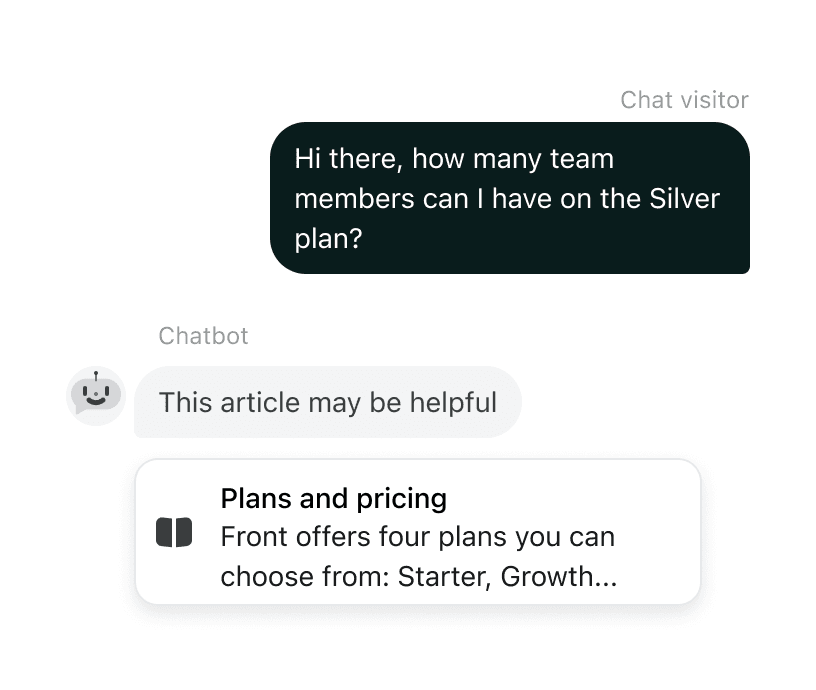
Phase 1: AI Suggested Help Articles
As we built the AI Answers feature to suggest help articles using AI in Phase 1, I led several key UX decisions that were critical to the overall product experience:
Key UX Decision #1: Node Modularity
The Challenge
How do we introduce AI Answers into the chatbot flow in a way that adapts to different admin needs?
For context, in the chatbot flow builder, admins customize how their chatbot talks and responds. Each of these nodes represent a step in the chatbot flow, with different node types such as Multiple Choice (to allow the chat visitor to pick from various options) or Branch by Keywords (which triggers branching based on specific keywords the chat visitor says).
Example of a chatbot flow builder
Building off the existing chatbot flow builder, we wanted to give teams a way to add AI Answers as its own step without disrupting the logic or flexibility they already relied on. We found that admins had very different ideas about when the AI should step in. Use cases we identified fell into 3 categories:
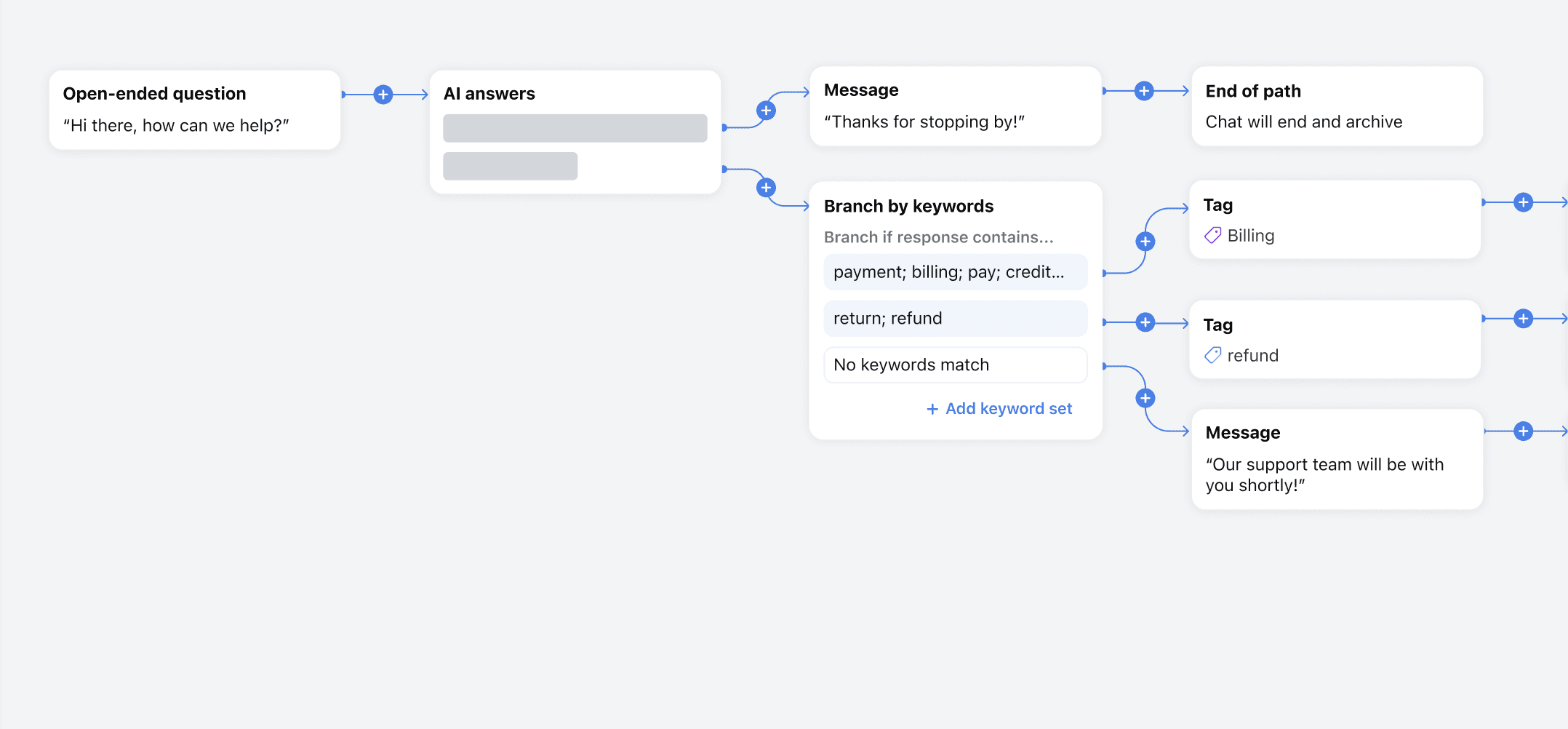
Category 1: AI-First Resolution
Some wanted AI to respond immediately after the visitor’s open-ended question, hoping to deflect low-effort questions without involving a human. If the AI didn’t help, the flow could still branch or escalate.
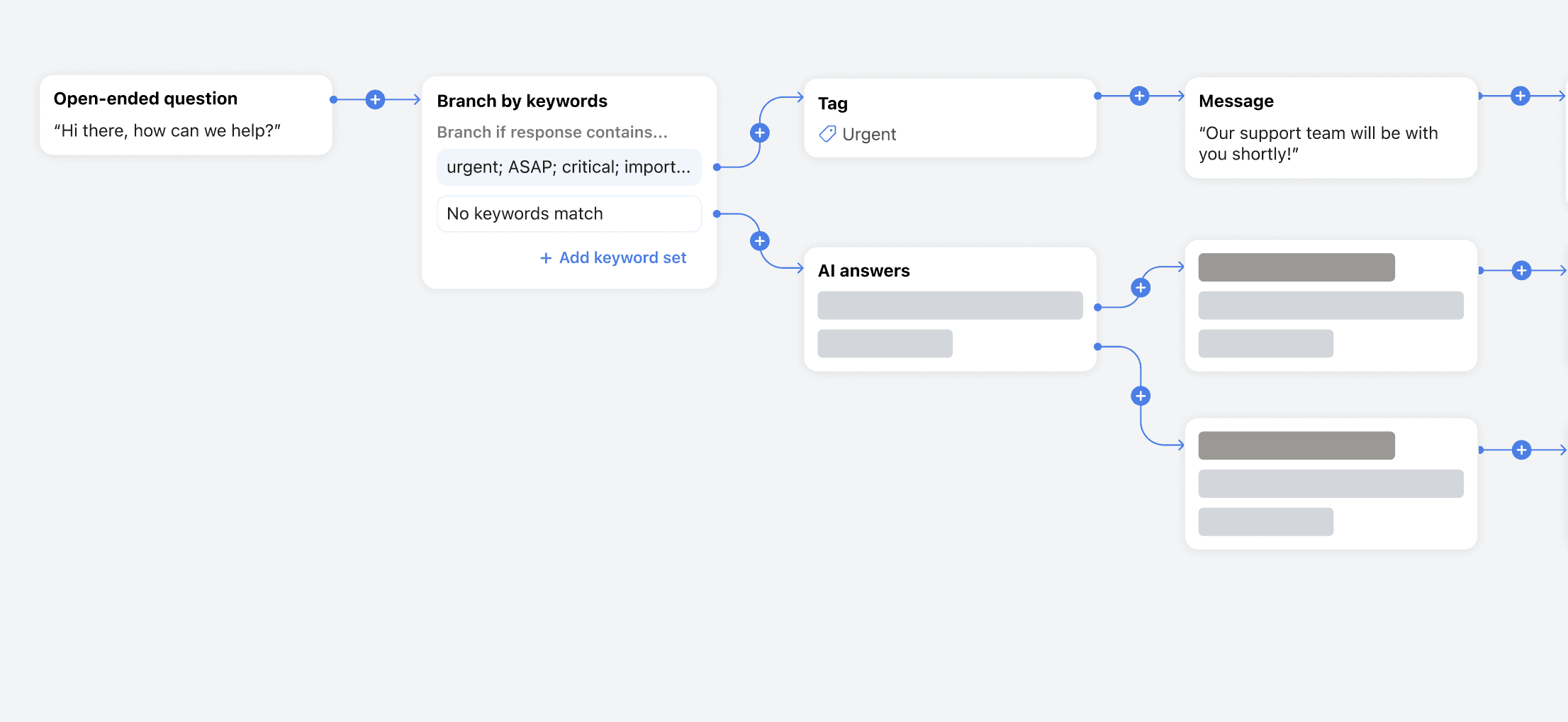
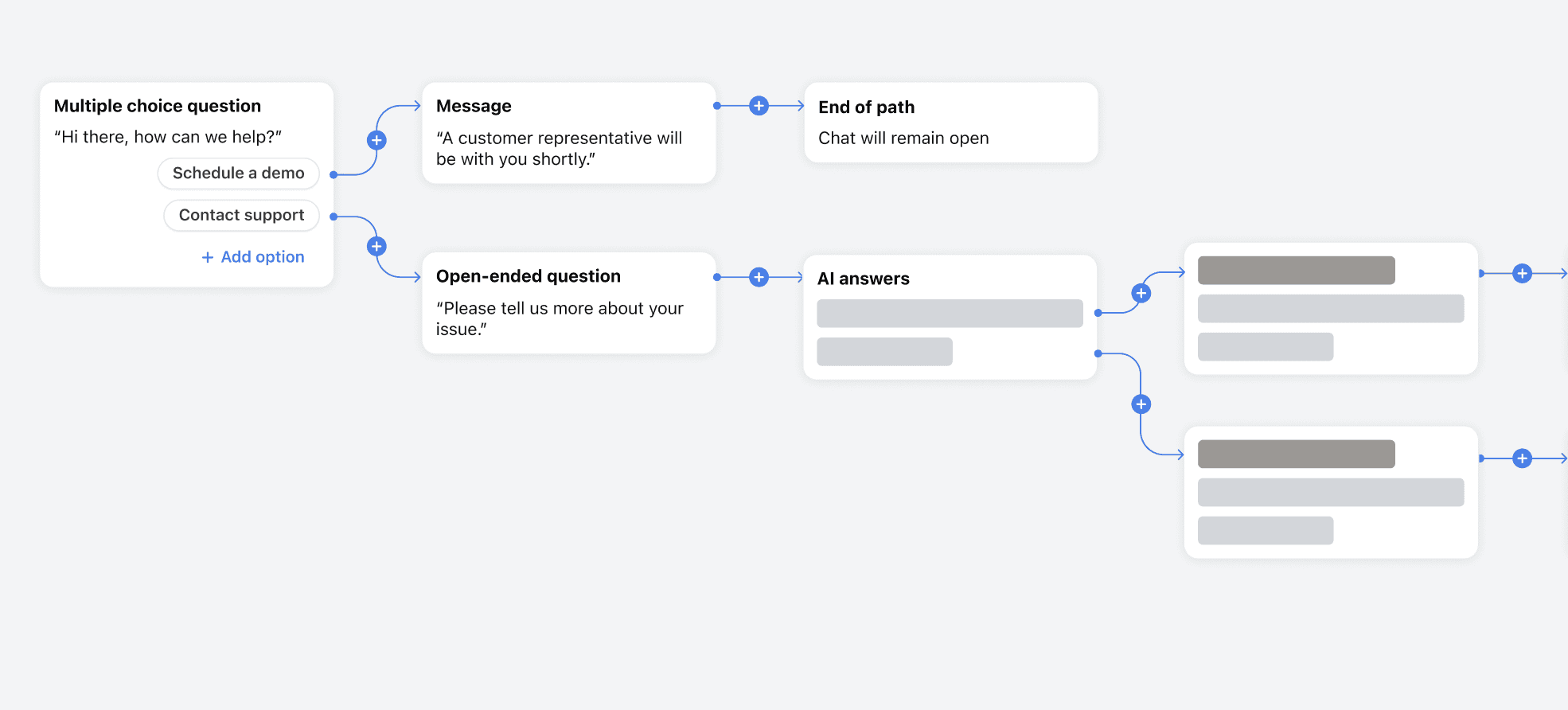
Category 2: Triage First, Then AI Answers
Others preferred to narrow down the topic first, then bring in AI. This would allow them to skip AI for sensitive cases or topics where they know they definitely want a human involved.
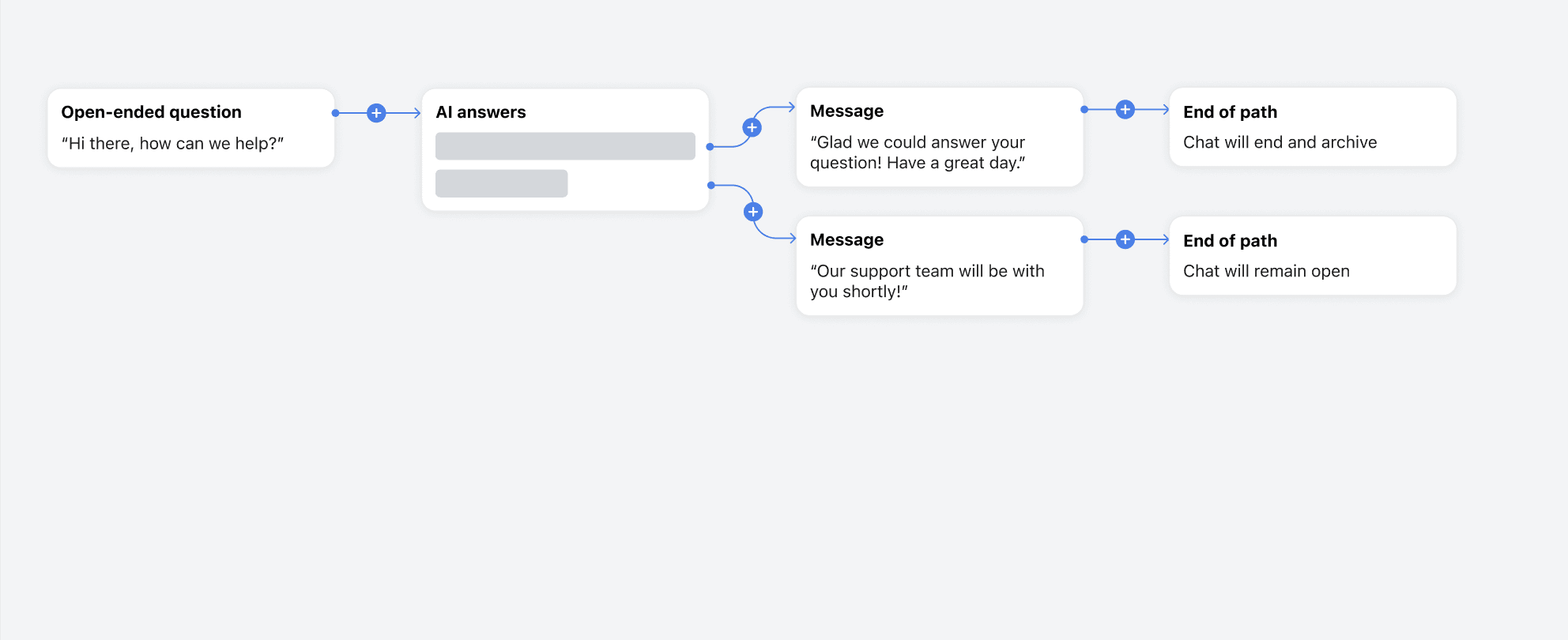
Category 3: AI With Minimal Setup
Some support managers we talked to, especially those with smaller support teams, didn't want to build and optimize a chatbot flow. Instead, they wanted the AI to answer from the get-go, and then a human agent would step in if the inquiry was unresolved
The Decision
We added AI Answers as its own step in the chatbot flow builder, giving admins full control over when and where it shows up in the flow. This modular approach meant admins could:
Insert AI early for quick wins
Use it as a fallback after other steps
Skip it entirely for specific branches
This flexibility let us meet teams where they were, instead of forcing a one-size-fits-all automation pattern.
Key UX Decision #2: Article Limitations
Key UX Decision #3: Interaction Resolution
The Challenge
To ensure that support teams could provide the best quality of service for chat visitors, admins needed to understand how visitor interactions with our AI Answers feature went.
There are three outcomes that could occur after the AI interaction:
The chatbot suggested articles, and they were helpful
The chatbot suggested articles, but they weren't helpful
The chatbot did not suggest any articles
We needed a way to determine if the articles were helpful to the visitor, and to allow the admin to build subsequent steps in their chatbot flow depending on the outcome.
The Decision
We included a built-in message that asked, “Did that answer your question?” and offered two options for visitors to respond: “Yes” or “No."
We chose not to make the copy of "Did that answer your question?" message customizable yet, since it carried low risk and there were no strong use cases we could think of to drive that. That said, we planned to monitor feedback in case admins wanted more control in the future.
In the chatbot flow, we decided that instead of branching into three paths from the AI Answers node, we created only two branches:
AI resolved the inquiry
AI didn't resolve the inquiry.
We couldn’t identify any cases where “unhelpful answer” and “no AI suggested articles” would result in different follow-up flows. Combining them into the one branch of "AI doesn't resolve the inquiry" would reduce the tediousness of having to set up duplicate subsequent flows.
Importantly, we still tracked all three outcomes separately in analytics, since understanding which fallback type occurred is valuable for reporting and improving AI performance.
The Designs
For the live chat visitor
For the chatbot admin
For the support agent
Chats resolved by the chatbot are automatically archived so agents don't have to deal with them. If they're not resolved by the bot, the agent wants full context of the visitor's exchange with the chatbot to better address the inquiry.
04. OUTCOME
Phase 1 Learnings
Instead of going straight to GA, we first conducted a beta of phase 1 on our own Front website's Live Chat with our own support team.
Metrics
The chatbot was able to suggest articles ~70% of the time. However, out of all the conversations where articles were suggested, only ~22% of people actually clicked on a help article and ~16% of inquiries were resolved.
The good: roughly 71% of people who clicked on a suggested article ended up finding it helpful.
The bad: people weren't clicking on the articles.
Outcome
We were in a situation where we could either focus on improving this feature and beta-ing it with customers. Or, we could wait until the AI engineers had developed AI generated responses, and double down on that path. We opted for the latter because of the low article click-through rates.
05. DESIGN & ITERATION
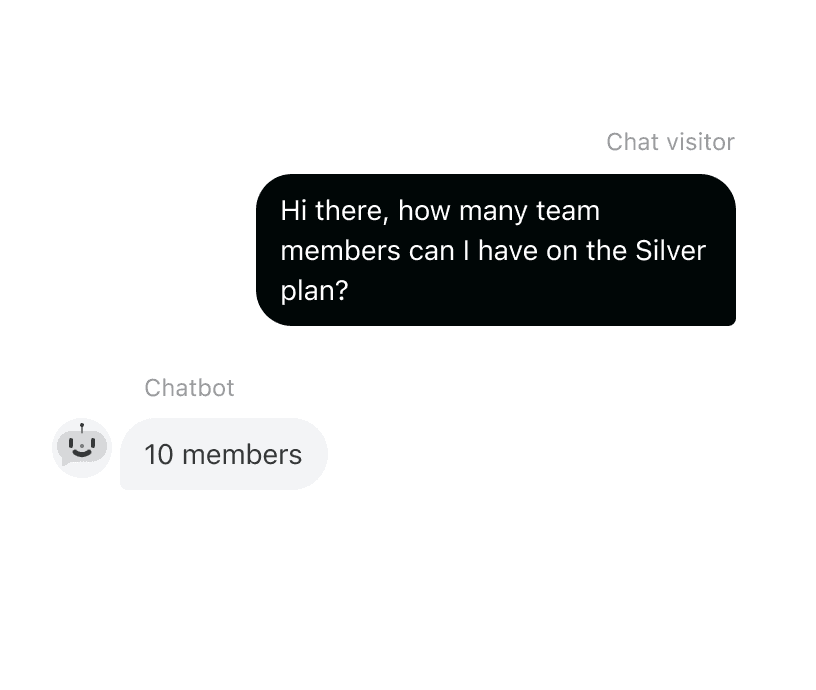
Phase 2: AI Generated Responses
Between Phases: Building Tools to Support AI Adoption
While AI engineers worked on building AI generated responses, we used the time between the two phases to design and launch two other features to support the success of AI powered live chat.
The first was chatbot analytics so that customers would know how the AI was performing.
The second was a chatbot previewer in the chatbot flow builder. This would allow admins to more easily test their AI Answers.
Phase 2: AI Generated Responses
While phase 1 didn’t land as hoped, it laid important groundwork. The design thinking behind the AI Answers node directly informed and accelerated our approach in the next phase.
Phase 1 also surfaced valuable learnings we could apply to this next phase:
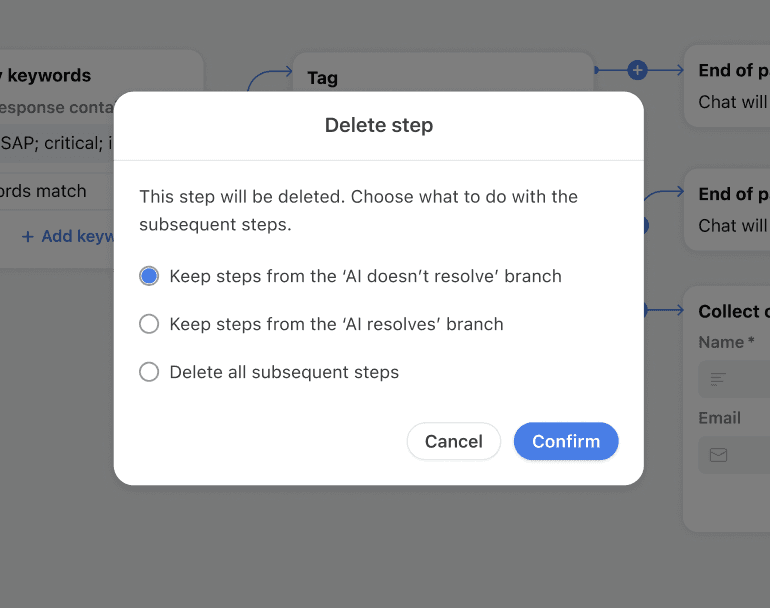
Deleting a node also deleted all downstream branches, but sometimes the admin would want to keep following steps. As a result I gave users the option to choose which branch to keep, if any.
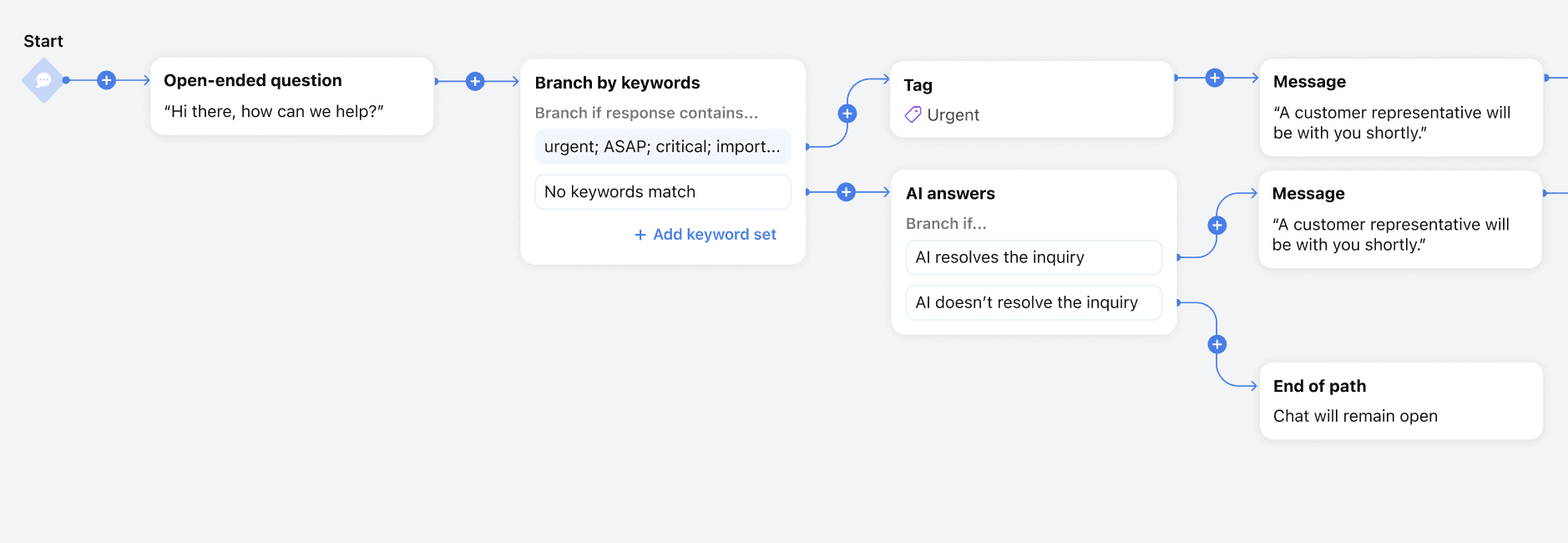
Upon inserting an AI Answers step in the middle of the flow, the steps following it would always follow the first "AI resolves the inquiry" branch, but sometimes the admin would want the existing following steps to actually come out of the second "AI doesn't resolve the inquiry" branch. Instead of having to delete all subsequent nodes then rebuild them again, we built a way for them to swap branches.
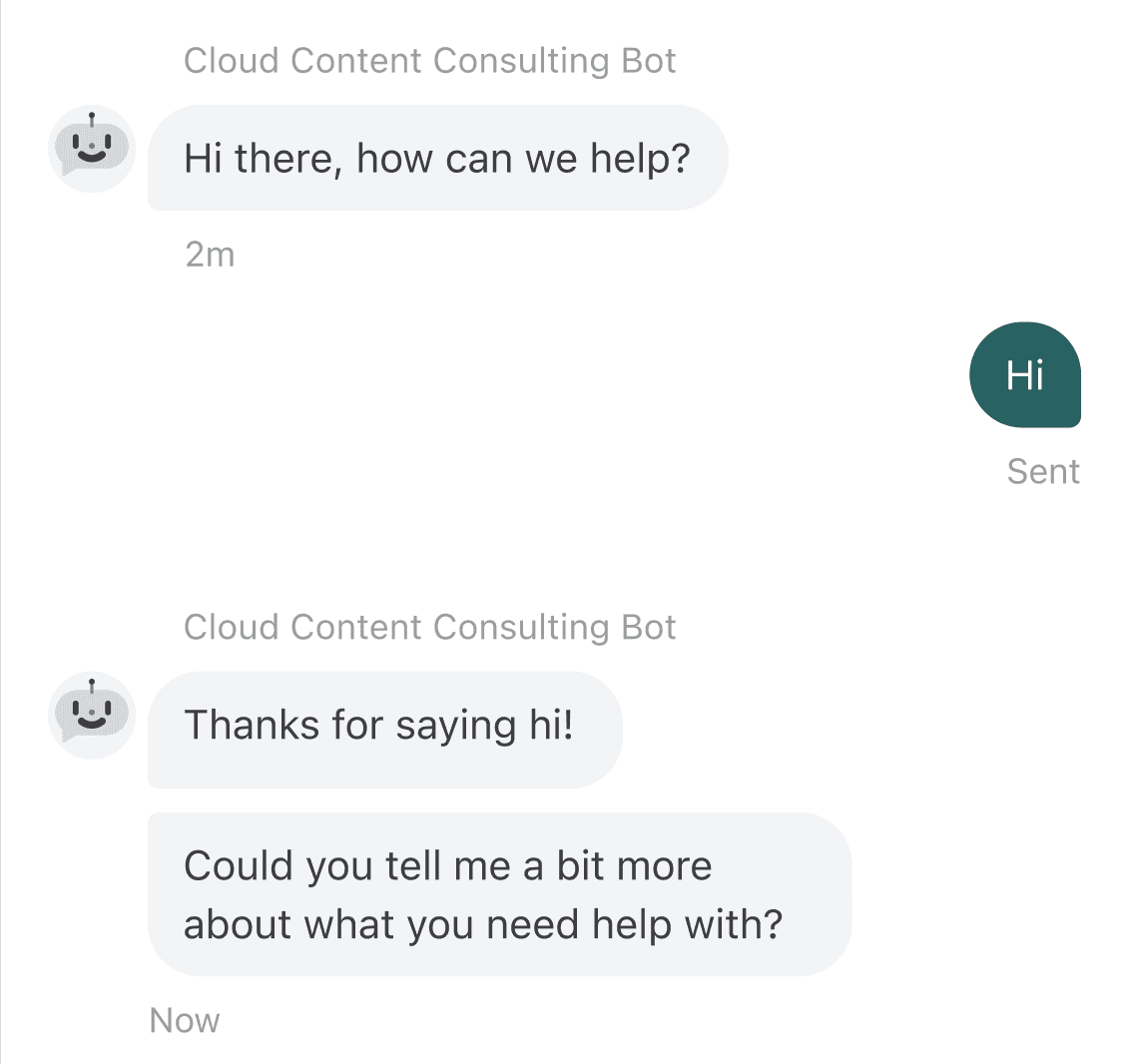
Especially when AI Answers was one of the first steps in the chatbot flow, chat visitors might just type in "Hi". Because of that, we changed the logic so that the chatbot will respond to clarify up to 3 times if necessary.
The Designs
For the live chat visitor
For the chatbot admin
The look and behavior of the AI Answers node remained mostly the same as as phase 1.
For the support agent
Chats resolved by the chatbot are automatically archived so agents don't have to deal with them. If they're not resolved by the bot, the agent wants full context of the visitor's exchange with the chatbot to better address the inquiry.
06. OUTCOME
Phase 2 Learnings
Beta
We launched the beta with 7 customers plus Front, totaling 8 participants.
Out of all the inquiries that reached AI Answers, the AI on average could provide an answer 70.29% of the time! Out of the times the AI provided an answer, the average AI resolution rate was 51.46%, showing strong effectiveness to resolve inquiries without human intervention.
Key Insight
Some teams placed AI Answers later in their chatbot flow, which meant only a small fraction of chats reached the AI node (e.g. Front: 14.1%, US Mobile: 5.4%). This limited the opportunity for AI to resolve inquiries.
Opportunities to Improve AI Resolution
Moving AI Answers earlier in the chatbot flow
This would increase the total number of conversations resolved by AI. Initially, customers were cautious about surfacing AI more upfront. Now that they had vetted the experience, they were open to moving it earlier in the flow.
Increase Knowledge Base content
Teams can further improve performance by adding more help content to answer common questions visitors are asking. This would further increase the success rate of the AI.
GA
All beta customers adopted AI Answers long-term, continuing its use after GA launch. Here's some of their stories:

Boundless Immigration
Up to 51% of inquiries Boundless Immigration directs to AI Answers are resolved instantly, dramatically improving the chat experience for clients.
“Resolution rates have been amazing, but it’s really all about CX (customer experience) for us. We’re just happy customers are getting faster and more consistent resolutions in chat.”
Enchanted Fairies
"AI Answers has reduced the workload for our team by hundreds of chats per month and made my team’s life a lot easier managing our chatbot and help center. We’ve been incredibly happy with the accuracy of AI Answers, with 50% of chats that reach the AI resolved instantly.”
Structured
"AI has enabled new self-service possibilities for our customers, as we don’t staff a live chat team. Instead we offer escalation to our team via email and their workload was cut by as much as 10% within a few weeks of adding AI Answers. We definitely think users are more satisfied with the AI responses as well!
The week AI Answers launched to GA, AI Answers successfully resolved 41 of Front's chat conversations with our own customers. Assuming a standard median time of 11 minutes per chat, that’s over 7.5 hours of agent time saved.
What's next
Here's ways we could evolve Live Chat or AI Answers to increase AI's effectiveness:
Post conversation CSAT rating to let chat visitors rate the interaction, including after an AI response
Path analytics to provide detailed data on each step of the chatbot flow, helping admins identify drop-off points and optimize where AI Answers should appear for maximum impact.
Enable A/B Testing to not only close a competitive gap, but also let admins test different chatbot flows and AI placements. This would accelerate learning and help improve resolution rates.
Custom tone of the AI that could be configured (e.g. friendly, concise, formal) to match customer's brands
Shorten the time it takes for AI to respond
My learnings and reflections
This project highlighted some of the challenges with working with emerging tech. Because of AI engineering limitations at the start, we had to figure out if we could build anything in the interim and we took a bet on AI suggested articles. Even though it wasn't successful, we learned about people's threshold for self-service in chat and it gave us a base to build from. On a personal level, this project made me reflect on the ethics of automation. As someone who worked closely with our support team for feedback, and was building for support teams, I care deeply about the humans behind the queue. Rather than replace them, I want to free them up so they can focus on the complex, relational work AI still can’t do. That’s the future I want to design for.